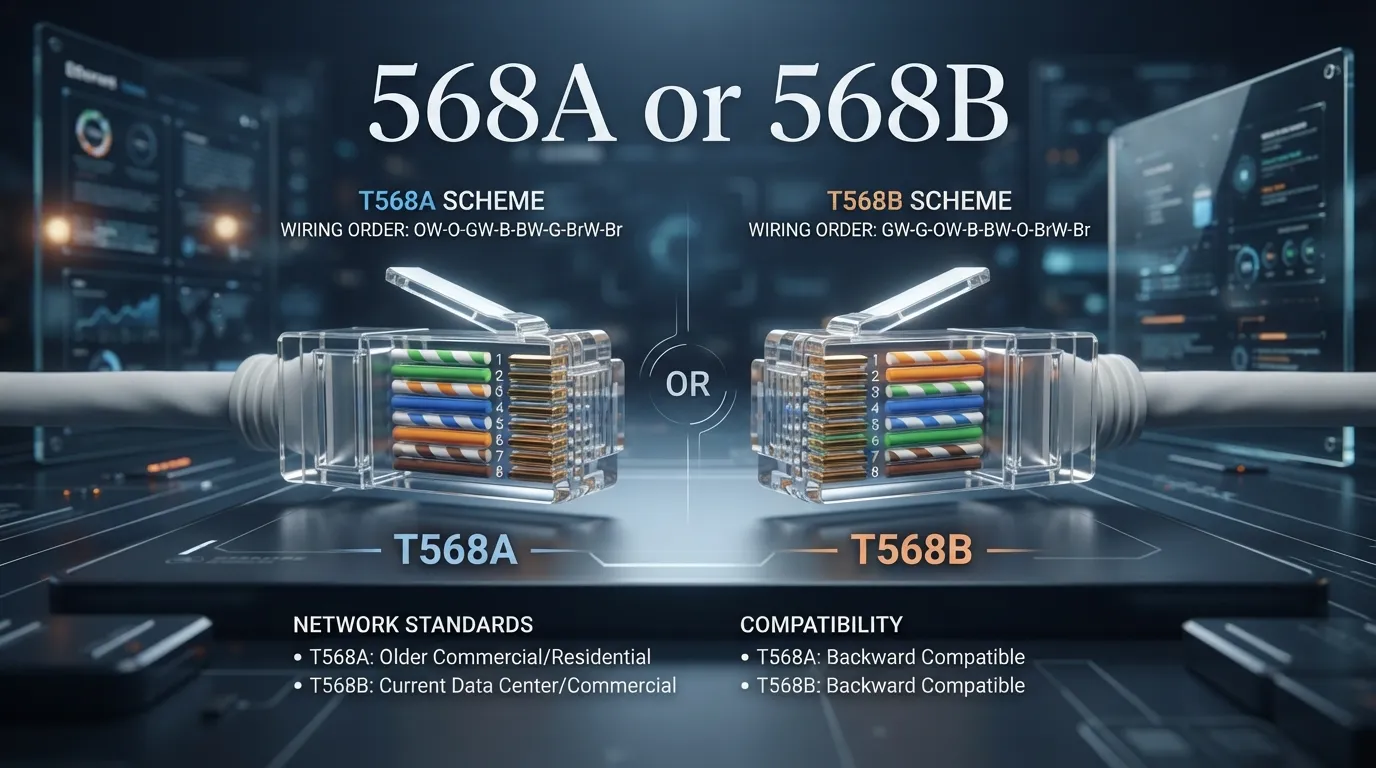
When you make an Ethernet cable, you may hear people talk about 568A or 568B. These names describe two wiring patterns used for network cables. Both patterns arrange eight small wires inside an RJ45-style connector in a set order. The main difference is the order of the wire colours.
Imagine you are making a cable to connect a computer to a router. You need to place the wires in the correct order before attaching the connector. If you follow the wrong order or mix the patterns without a reason, the cable may not work as expected.
T568A and T568B are both accepted Ethernet wiring patterns. The main difference is the position of the green and orange wire pairs. For a normal Ethernet patch cable, use the same pattern at both ends. T568A at both ends or T568B at both ends creates a straight-through cable.
These patterns are often called 568A and 568B, but their full names are T568A and T568B. Knowing the difference helps you make network cables correctly, follow wiring standards, and fix connection problems.
US and UK Pronunciation
- T568A: “T five-six-eight A.”
- T568B: “T five-six-eight B.”
The names are spoken in the same way in US and UK English.
Difference Between 568A and 568B
1. Wire Colour Order
T568A and T568B use the same eight wires, but two colour pairs change places.
- T568A starts with white-green, then green.
- T568B starts with white-orange, then orange.
2. Green and Orange Pairs
The green and orange pairs switch positions between the two patterns.
- T568A places the green pair in pins 1 and 2.
- T568B places the orange pair in pins 1 and 2.
3. Blue Pair
Both patterns keep the blue pair in the same positions.
- T568A uses blue on pins 4 and 5.
- T568B also uses blue on pins 4 and 5.
4. Brown Pair
The brown pair also stays in the same place in both patterns.
- T568A uses brown on pins 7 and 8.
- T568B uses brown on pins 7 and 8.
5. Network Use
Both patterns can support Ethernet connections when the cable and equipment meet the required standards.
- A T568A cable can connect a computer to a router.
- A T568B cable can also connect a computer to a router.
6. Straight-Through Cables
A straight-through cable uses the same wiring pattern at both ends.
- T568A on both ends makes a straight-through cable.
- T568B on both ends also makes a straight-through cable.
7. Crossover Cables
Using T568A at one end and T568B at the other creates a traditional crossover cable.
- T568A on one end and T568B on the other swaps the green and orange pairs.
- This pattern was once useful for directly connecting some similar network devices.
8. Installation Choice
The best pattern often depends on the existing network and the required wiring standard.
- Use T568A if the installation specifies it.
- Use T568B if the installation specifies it.
9. Matching Existing Cables
Following the same pattern across a network makes work easier and reduces mistakes.
- Use T568A to match an existing T568A installation.
- Use T568B to match an existing T568B installation.
10. Correct Installation
Both patterns work well when the wires are arranged properly and the cable is tested.
- Check the pin order before crimping a T568A connector.
- Check the pin order before crimping a T568B connector.
You may also read https://lengovia.com/buggy-or-buggie/
Nature and Behaviour
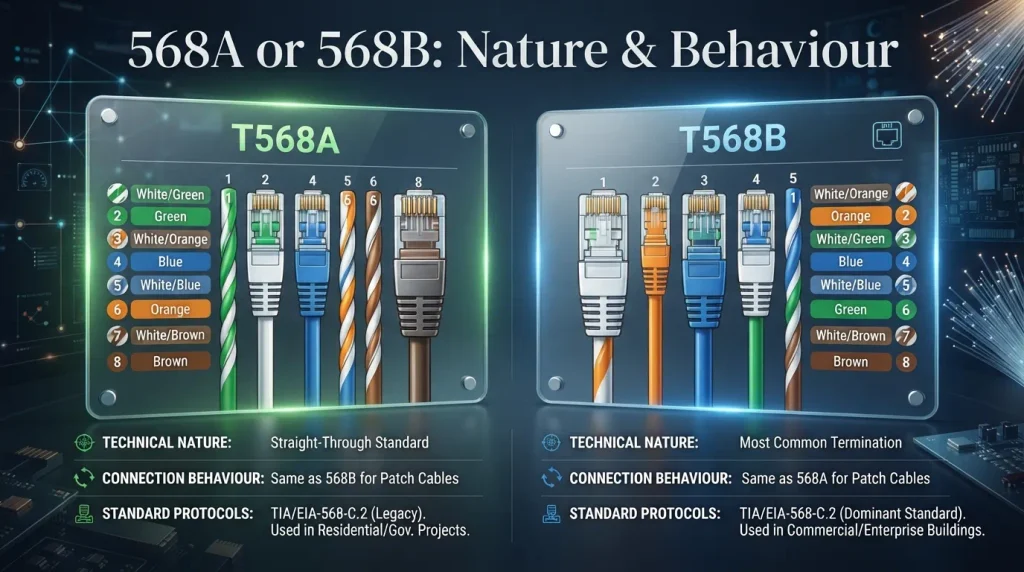
T568A and T568B are wiring standards for twisted-pair network cables. Each standard tells you where to place the eight coloured wires in the connector.
The two patterns do the same basic job. They connect network devices through Ethernet cables. Neither pattern is always better than the other. The right choice depends on the wiring plan and the cables already in place.
Why Do People Get Confused?
People often get confused because both patterns use the same eight wires. Most of the colour order stays the same, but the green and orange pairs change places.
The names also look similar. Remember this simple rule: T568A starts with the green pair, while T568B starts with the orange pair.
Comparison Table
| Feature | T568A | T568B |
|---|---|---|
| First wire | White-green | White-orange |
| Second wire | Green | Orange |
| Pins 1–2 | Green pair | Orange pair |
| Pins 3 and 6 | Orange pair | Green pair |
| Blue pair | Pins 4–5 | Pins 4–5 |
| Brown pair | Pins 7–8 | Pins 7–8 |
| Same pattern at both ends | Straight-through cable | Straight-through cable |
| Different patterns at each end | Crossover cable when paired with T568B | Crossover cable when paired with T568A |
Correct Wire Order for Each Pattern
Always check the pin order before attaching the connector.
T568A wire order:
- White-green
- Green
- White-orange
- Blue
- White-blue
- Orange
- White-brown
- Brown
T568B wire order:
- White-orange
- Orange
- White-green
- Blue
- White-blue
- Green
- White-brown
- Brown
Origin of the Standards
T568A and T568B come from structured cabling standards used for telecommunications and network installations. These standards give installers a clear way to arrange wires in network cables.
The two patterns became common ways to wire Ethernet cables. They help installers make cables that follow a known order.
British vs American English
The terms T568A and T568B have the same meaning in British and American English. Both refer to network cable wiring patterns.
There is no spelling difference between the two countries. Network installers in both places can use these names when discussing Ethernet wiring.
Which One Should You Use?
Choose the pattern that matches your network’s wiring plan.
- Use T568A if your installation guide or existing wiring calls for it.
- Use T568B if your installation guide or existing wiring calls for it.
- For a new cable, use the same pattern at both ends unless you have a specific reason to make a crossover cable.
Neither pattern gives a general speed advantage when the cable and installation meet the same requirements.
Common Mistakes
– Mistake: Starting T568A with white-orange. Correct: Start T568A with white-green.
– Mistake: Starting T568B with white-green. Correct: Start T568B with white-orange.
– Mistake: Using one pattern at each end without knowing why. Correct: Use the same pattern at both ends for a normal straight-through cable.
– Mistake: Assuming the cable will work just because the colours look right. Correct: Check the pin order and test the finished cable.
Everyday Usage Examples
At Work
“Our office uses T568B for its Ethernet patch cables.”
During Cable Repair
“Check the wire order before you replace the connector.”
In a Network Installation
“Follow T568A because the building’s wiring plan requires it.”
When Testing a Cable
“The cable tester found a wiring fault on pin three.”
Usage Trends
Both T568A and T568B are used in network installations. The pattern an installer chooses often depends on the local wiring plan, the building’s existing cables, or the project rules.
In many modern networks, devices can detect and adjust to straight-through or crossover wiring automatically. This feature is called Auto MDI-X. Even so, correct wiring remains important for reliable connections and easy repairs.
Metaphors and Similes
You can think of the wire order like seats on a bus. Every wire has its own place. If you put wires in the wrong places, the connection may not work correctly.
You can also think of T568A and T568B as two maps that guide the same eight wires. The maps differ in the positions of the green and orange pairs.
Connotative Meaning
T568A and T568B do not have emotional meanings. They are technical names. They help people talk clearly about network wiring.
For an installer, knowing these names can suggest good planning, careful work, and a clear way to fix problems.
Idioms and Proverbs
There are no common English idioms or proverbs based on T568A or T568B. However, the saying “Measure twice, cut once” fits cable work. It reminds you to check the wire order before cutting or crimping the cable.
Literature and Movies
T568A and T568B are technical terms, so they are not common topics in classic literature. They are more likely to appear in computer guides, network training books, and technical videos.
These learning resources often use colour diagrams to show the correct wire order.
Why This Difference Matters
The difference matters because the wire order affects how a cable is connected. If you mix up the patterns or place wires in the wrong pins, the cable may fail a test or cause connection problems.
Knowing the two patterns also helps you match existing wiring. This can save time when you install new network points or repair an old cable.
Usefulness in Daily Life
You may need to know these patterns when setting up a home network, connecting office computers, or making an Ethernet cable. You can use the correct order to prepare each connector.
If a cable does not work, check both ends. Make sure the wires follow the intended pattern. Then use a cable tester to check the connection.
Situational Preference
The best choice depends on the job. If you are repairing an existing network, follow the pattern already used in that network. This helps keep the installation consistent. If you are setting up a new network, follow the project plan or the instructions from the installer. For a normal patch cable, use T568A at both ends or T568B at both ends. If you use T568A at one end and T568B at the other, you create a traditional crossover cable. Modern network devices often support Auto MDI-X, but you should still follow the required wiring plan.
Multiple-Choice Questions
1. What do T568A and T568B describe? A. Cable colours for decoration B. Network wire patterns C. Types of computers D. Internet plans
2. Which pair starts T568A? A. Green B. Orange C. Blue D. Brown
3. Which pair starts T568B? A. Brown B. Blue C. Orange D. Green
4. What cable do you get when both ends use T568B? A. A straight-through cable B. A power cable C. A phone charger D. A fibre cable
5. What should you do before crimping a connector? A. Remove the blue wires B. Mix all the colours C. Check the wire order D. Cut the connector
Answers: 1-B, 2-A, 3-C, 4-A, 5-C.
Expected Questions
1. What is the main difference between T568A and T568B?
The green and orange wire pairs switch positions.
2. Which pattern is better, T568A or T568B?
Neither is always better. Follow the wiring plan and match the existing installation.
3. Can I use T568A at one end and T568B at the other?
Yes. This creates a traditional crossover cable.
4. Should both ends of a normal Ethernet cable match?
Yes. Use T568A at both ends or T568B at both ends for a straight-through cable.
5. Do T568A and T568B change internet speed?
Neither pattern gives a general speed advantage when the cable and installation meet the same requirements.
6. How can I check my Ethernet cable?
Check the wire order and use a cable tester to confirm that the pins connect correctly.
Conclusion
568A or 568B are two common patterns for arranging the eight wires in an Ethernet cable. Both can provide a good network connection when installed correctly. The main difference is the position of the green and orange pairs.T568A starts with the white-green wire, while T568B starts with the white-orange wire. The blue and brown pairs stay in the same positions. For a normal Ethernet patch cable, use the same pattern at both ends. This creates a straight-through cable.Neither pattern is always the best choice. Follow the wiring plan and match the existing network when possible. If you use T568A at one end and T568B at the other, you make a traditional crossover cable. Modern devices often handle crossover connections automatically, but correct wiring is still important. Always check the wire order and test the cable before using it.

Mahnoor Afzal is an educator, researcher, and English language content specialist focused on grammar, vocabulary, word differences, and meanings. I combines research, teaching, and SEO expertise to create clear and reliable English learning content at Lengovia.











1 thought on “568A or 568B: Meaning, Differences, and Correct Wiring Order”